Book an Appointment
Call Miramar Computer Repair Service at 754-241-1655
                   

(754) 241-1655

*


Miramar Computer Repair Service has provided the best mobile computer repair in Miramar, FL and the greater Miami Metropolitan Area since 1999. The term "mobile computer repair" means we come to you to resolve all your computer problems.

We repair laptops, desktops, PCs and Apple computers. One of our highly qualified staff will come to you, often the same day, to take care of all your repair needs.

Why not use the #1 rated company for computer repair in Miramar, FL?

Computer Repair 4.9 / 5 stars from 324 reviews
Why use a computer tech when you can have a Miramar based Computer Engineer? Mon-Sun 8:00am - 8:00pm

Call us at (754) 241-1655

Text us at (754) 241-1655

Email us your questions

Book an Appointment

"Great service and friendly staff. Got my computer fixed same day, thank you!"
Miramar Computer Repair Service 5 / 5 stars
"Dustin, the technician, did an awesome job. He kept me informed along the job. Techs like Dustin, make me a customer for life. "
Miramar Computer Repair Service 5 / 5 stars
"Wonderful service, from the initial phone call and scheduling, very upfront on costs. The tech showed up on time, with a 15 min courtesy call, he was professional, knowledgeable and gave great advice. He replaced my hard drive and got me back up and running. I would recommend this service. I chose it because of all the positive online reviews and I was not disappointed."
Miramar Computer Repair Service 5 / 5 stars
"Josh was again superb. He reinstalled my HP printer software and now I can scan once again. Much thanks for your service."
Miramar Computer Repair Service 5 / 5 stars
"Fast service! Fixed all of my computer problems and was very helpful in making suggestions on products I needed. He arrived on time and was professional. Overall a very pleasant experience and I will call again!"
Miramar Computer Repair Service 5 / 5 stars

Who is Miramar Computer Repair Service?

Miramar Computer Repair Service is owned by Matt Karls, an Electrical Engineer and a Computer Systems Engineer. We are a team of computer professionals focused on Service and quality, all our work is guaranteed.

If you have any computer, technology or IT problem in Miramar, FL we can fix it. We have been performing computer repair in Miramar full time since 1999. Feel free to give us a call or text us at (754) 241-1655.

Miramar Computer Repair Service's Computer Engineer

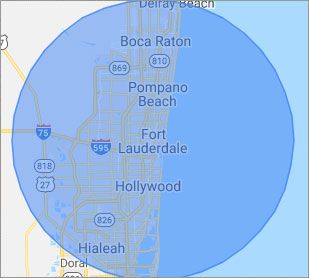
What is your Service Area for on-site Computer Repair?

Our primary on-site mobile service areas include the greater Miami Metropolitan Area as well as the Tampa, Orlando and Jacksonville metro areas.

We provide remote and mobile computer repair in Miramar, Fort Lauderdale, Hialeah, Hollywood, Pembroke Pines, Miami, Coral Springs, Miami Gardens, Pompano Beach, West Palm Beach, Davie, Boca Raton, Sunrise, Plantation, Miami Beach, Deerfield Beach, Boynton Beach, Weston and Coral Gables.

Our on-site Computer Service Area

What should someone expect that hires you for Computer Service?

Our mission is to fully resolve your computer problems quickly and affordably. If you want a Computer Engineer that can fix all of your computer problems instead of a computer tech, a computer geek, a technician or a computer guy that can only fix some of your problems; call us at (754) 241-1655.  

What types of Computer Services do you perform?

We service businesses and business clients in their homes, including:
 
  • Diagnose / repair hardware or software problems
  • Spyware, malware, trojan and virus removal
  • Setup wireless and small business networks
  • Laptop repair, PC repair and Apple repair
  • Hard drive data recovery

Miramar Computer Repair Service Contact Information

Miramar Computer Repair Service
Miramar, FL 33025
(754) 241-1655

Miramar Computer Repair Service is a Karls Technology company

* *
*
*
*
  *
* *


*
*
* * * * * * * * * * * * * * *
4.9 / 5 stars from 324 reviews

"Great service and easy to work with!!!"

Miramar Computer Repair Service 5 / 5 stars

"Anthony was very helpful in each step of the process, very professional."

Miramar Computer Repair Service 5 / 5 stars

"My tech was great and appeared knowledgeable, I won't hesitate to contact again and I would highly recommend."

Miramar Computer Repair Service 5 / 5 stars

"Taylor worked through 6 PC systems with great ease. Very satisfied with his skills and his help servicing our systems."

Miramar Computer Repair Service 5 / 5 stars
Best Antivirus Software of 2026: The Ultimate Guide to Cybersecurity Brands

In 2026, the digital threat landscape has shifted. We are no longer just fighting simple viruses; we are defending against AI-generated phishing, sophisticated ransomware-as-a-service, and complex identity theft. Choosing the right antivirus brand is no longer optional—it is the foundation of your digital life. At Karls Technology, we’ve analyzed the top-performing security suites of the […] The post Best Antivirus Software of 2026: The Ultimate Guide to Cybersecurity Brands appeared first on Computer Repair Blog.

Remote Tech Support Can Be Risky

Using remote tech support is a high risk situation. Scammers posing as remote tech help can install malware on victims’ computers. Malware can remotely access a device, allowing hackers to inspect its data and take control. If you encounter infected pop-ups, don’t call any of the known software tech companies. Scammers will demand urgent payment […] The post Remote Tech Support Can Be Risky appeared first on Computer Repair Blog.

Windows 11 Remote Desktop Issues

Microsoft is looking into reports of Remote Desktop issues on Windows 11 computers following installation of the Windows 11 2022 Update. According to Bleeping Computer, it is possible that after upgrading to Windows 11 22H2, Remote Desktop clients will either fail to connect, detach unexpectedly, or stop working altogether. Until Microsoft releases official fixes, you […] The post Windows 11 Remote Desktop Issues appeared first on Computer Repair Blog.

Stop Applications From Starting Automatically

After being installed, certain programs will operate in the background on occasion. Even while it works for a few apps, its overall performance is poor. System performance drops when a large number of apps are set to launch automatically. For optimal speed, unnecessary programs during startup should be disabled. The good news is that Windows […] The post Stop Applications From Starting Automatically appeared first on Computer Repair Blog.

Limiting Bandwidth on Your PC

Almost every program you download to your computer from the internet consumes some data. Problems may arise, however, if you are not frugal with your data usage. Information loss can be avoided by putting a cap on the amount of data your computer can transfer at once. If you have a fixed data allowance, controlling […] The post Limiting Bandwidth on Your PC appeared first on Computer Repair Blog.

Benefit of Reducing Amount of Tabs and Windows on PC

The processing power of your computer is shared by all of the apps you run. If you’re trying to execute software and it’s taking a long time, you should be patient. If your computer freezes for a minute, you should not instantly press the power button to shut it off. Trust your instincts about whether […] The post Benefit of Reducing Amount of Tabs and Windows on PC appeared first on Computer Repair Blog.

Upcoming VPN Feature on Windows 11

As of Windows 11, a message may soon appear in the system tray when you are connected to a VPN, allowing you to confirm that you are connected if you prefer anonymous browsing. Virtual Private Networks (VPNs) make it possible to surf the Internet without being traced. Unfortunately for companies, this location-insensitive technology is useless […] The post Upcoming VPN Feature on Windows 11 appeared first on Computer Repair Blog.

Don’t Install Unfamiliar Browser Extensions

You should be aware of how unsafe it is to install software on your personal computer that you are unfamiliar with and have no idea what it does. Including things like putting in browser extensions. Users assumed browser add-ons were safe because they were uninformed about the dangers they could offer. In short, be weary […] The post Don’t Install Unfamiliar Browser Extensions appeared first on Computer Repair Blog.

Apple’s New Automatic Verification Feature

Automatic Verification, introduced in iOS 16, allows users to skip CAPTCHA validation by using iCloud to discreetly authenticate their device and Apple ID. It is no longer necessary to interpret squiggly language or tap on traffic signal graphics to demonstrate whether or not you’re not a bot. According to MacRumors, iOS 16 automatically enables Automatic […] The post Apple’s New Automatic Verification Feature appeared first on Computer Repair Blog.

What is the Three Finger Salute from Microsoft?

The Three Finger Salute is terminology for the Ctrl+Alt+Del keyboard shortcut established by IBM PC co-creator and engineer David Bradley. It’s common practice to use the three keys whenever a PC fails to load Windows or gets stuck during the boot process. You can lock the computer, switch users, log out, open the task manager, […] The post What is the Three Finger Salute from Microsoft? appeared first on Computer Repair Blog.